RAG Chatbot with Laravel and pgvector
Build a production-grade RAG chatbot using Laravel, PostgreSQL pgvector, and OpenAI embeddings for accurate domain-specific answers from your own documents.
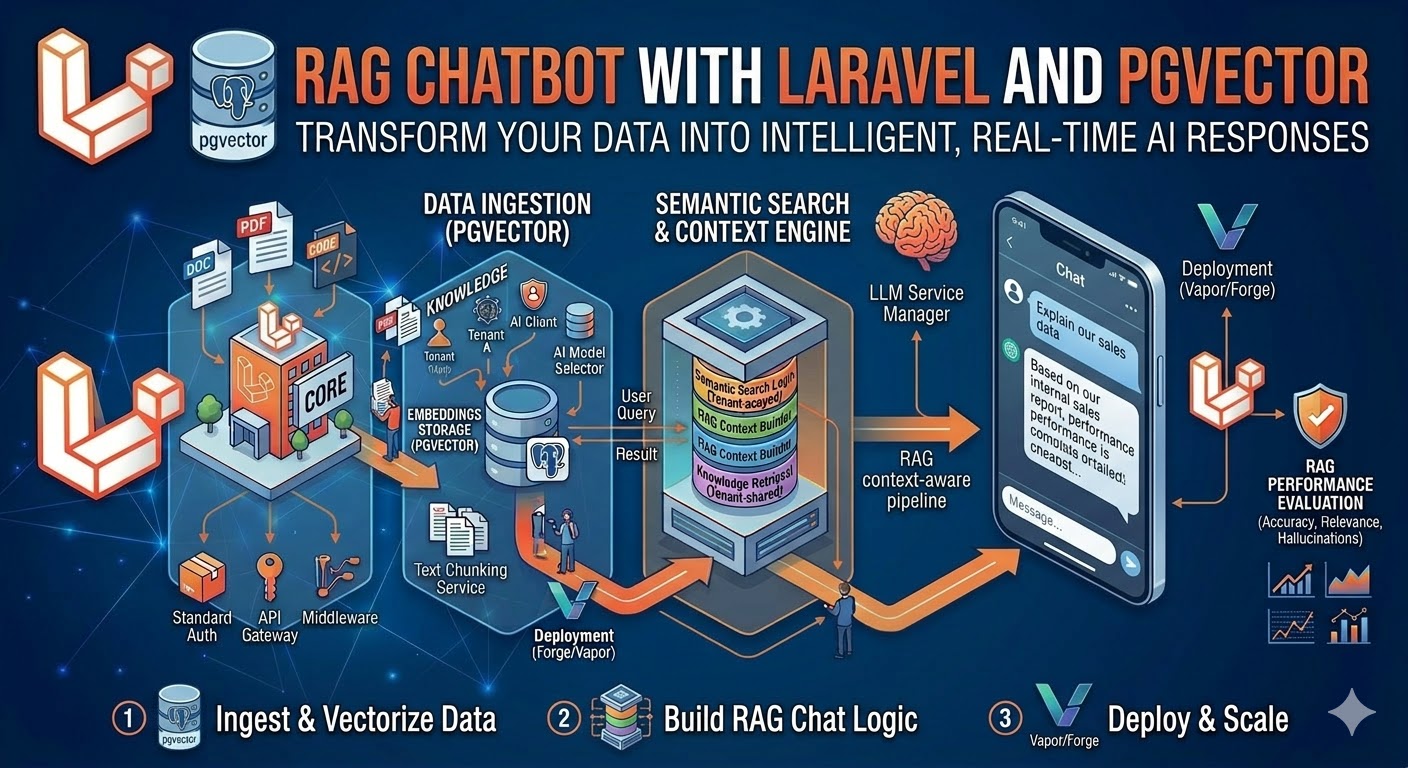
What is RAG and Why Does It Matter?
Retrieval-Augmented Generation (RAG) is a technique that combines the language fluency of large language models with the factual accuracy of your own knowledge base. Instead of asking GPT-4o to answer a question from its training data — which may be outdated, hallucinated, or simply wrong about your product — RAG retrieves the most relevant passages from your documents first, then feeds them as context into the LLM prompt.
The result is a chatbot that gives accurate, grounded answers specific to your domain, with dramatically lower hallucination rates than a plain LLM. I built a RAG-powered support chatbot for a SaaS client that deflected 74% of their support tickets automatically — customers got instant, accurate answers from the product documentation instead of waiting in a queue.
This guide walks through building a complete RAG pipeline in Laravel with PostgreSQL pgvector as the vector store and OpenAI for embeddings and generation.
How RAG Works: The Core Pipeline
RAG has two distinct phases that run at different times:
Ingestion phase (runs when documents are added or updated):
- Split your document into chunks (paragraphs, sections, or fixed token windows)
- Send each chunk to the OpenAI Embeddings API to get a 1536-dimension float vector
- Store the chunk text and its vector in PostgreSQL with pgvector
Query phase (runs on every user question):
- Embed the user's question using the same OpenAI model
- Query pgvector for the k most similar chunks using cosine similarity
- Inject those chunks as context into a GPT-4o prompt
- Stream the response back to the user
Setting Up pgvector on PostgreSQL
pgvector is a PostgreSQL extension. On most managed Postgres services (Supabase, Neon, RDS with pgvector, Railway), it is available via a single command. On a self-managed server:
-- Run in psql as superuser
CREATE EXTENSION IF NOT EXISTS vector;
Verify it is installed:
SELECT extname, extversion FROM pg_extension WHERE extname = 'vector';
-- vector | 0.7.0
Creating the Embeddings Table
php artisan make:migration create_document_chunks_table// database/migrations/xxxx_create_document_chunks_table.php
use Illuminate\Database\Migrations\Migration;
use Illuminate\Database\Schema\Blueprint;
use Illuminate\Support\Facades\Schema;
use Illuminate\Support\Facades\DB;
return new class extends Migration
{
public function up(): void
{
Schema::create('document_chunks', function (Blueprint $table) {
$table->id();
$table->foreignId('document_id')->constrained()->cascadeOnDelete();
$table->text('content'); // the raw text chunk
$table->integer('chunk_index'); // position in the original document
$table->integer('token_count'); // approximate token count for this chunk
$table->string('embedding_model')->default('text-embedding-3-small');
$table->timestamps();
});
// Add the vector column separately — Laravel Blueprint does not support it natively
DB::statement('ALTER TABLE document_chunks ADD COLUMN embedding vector(1536)');
// Create an HNSW index for fast approximate nearest-neighbor search
// HNSW is significantly faster than IVFFlat for most use cases
DB::statement('CREATE INDEX document_chunks_embedding_hnsw
ON document_chunks USING hnsw (embedding vector_cosine_ops)
WITH (m = 16, ef_construction = 64)');
}
public function down(): void
{
Schema::dropIfExists('document_chunks');
}
};The vector(1536) type stores OpenAI's text-embedding-3-small output. If you use text-embedding-3-large, change this to vector(3072). The HNSW index (Hierarchical Navigable Small World) gives sub-millisecond similarity search even at millions of vectors.
Document Ingestion Pipeline
Step 1: Chunking Strategy
How you chunk your documents is the single biggest factor in RAG quality. Chunks that are too small lose context. Chunks that are too large dilute relevance and eat into your prompt token budget.
For structured documentation (markdown, HTML), chunk by section (H2 or H3 boundaries). For unstructured text, use a sliding window with overlap:
// app/Services/DocumentChunker.php
class DocumentChunker
{
    private const CHUNK_SIZE    = 400;  // target tokens per chunk
    private const CHUNK_OVERLAP = 50;   // overlap tokens between chunks

    public function chunk(string $text): array
    {
        // Rough tokenization: ~4 chars per token for English
        $words = preg_split('/\s+/', trim($text), -1, PREG_SPLIT_NO_EMPTY);
        $chunks = [];
        $step   = self::CHUNK_SIZE - self::CHUNK_OVERLAP;

        // Approximate: 1 word ≈ 1.3 tokens
        $wordsPerChunk    = (int) (self::CHUNK_SIZE / 1.3);
        $wordsPerStep     = (int) ($step / 1.3);

        for ($i = 0; $i < count($words); $i += $wordsPerStep) {
            $slice = array_slice($words, $i, $wordsPerChunk);
            if (count($slice) < 20) break; // skip tiny tail chunks

            $chunks[] = implode(' ', $slice);
        }

        return $chunks;
    }
}
Step 2: Generating Embeddings
// app/Services/EmbeddingService.php
class EmbeddingService
{
    public function __construct(private readonly Client $openai) {}

    public function embed(string $text): array
    {
        $response = $this->openai->embeddings()->create([
            'model' => 'text-embedding-3-small',
            'input' => $text,
        ]);

        return $response->embeddings[0]->embedding; // array of 1536 floats
    }

    public function embedBatch(array $texts): array
    {
        // OpenAI supports up to 2048 inputs per batch request
        $response = $this->openai->embeddings()->create([
            'model' => 'text-embedding-3-small',
            'input' => $texts,
        ]);

        return array_map(
            fn($e) => $e->embedding,
            $response->embeddings
        );
    }
}
Step 3: The Ingestion Job
// app/Jobs/IngestDocument.php
class IngestDocument implements ShouldQueue
{
    public function __construct(private Document $document) {}

    public function handle(DocumentChunker $chunker, EmbeddingService $embedder): void
    {
        // 1. Delete existing chunks for this document (for re-ingestion)
        $this->document->chunks()->delete();

        // 2. Chunk the document content
        $chunks = $chunker->chunk($this->document->content);

        // 3. Generate embeddings in batches of 100 (API efficiency)
        $batchSize  = 100;
        $chunkIndex = 0;

        foreach (array_chunk($chunks, $batchSize) as $batch) {
            $embeddings = $embedder->embedBatch($batch);

            foreach ($batch as $i => $chunkText) {
                $vectorString = '[' . implode(',', $embeddings[$i]) . ']';

                DB::statement(
                    'INSERT INTO document_chunks
                     (document_id, content, chunk_index, token_count, embedding, created_at, updated_at)
                     VALUES (?, ?, ?, ?, ?::vector, NOW(), NOW())',
                    [
                        $this->document->id,
                        $chunkText,
                        $chunkIndex++,
                        (int) (str_word_count($chunkText) * 1.3),
                        $vectorString,
                    ]
                );
            }
        }

        $this->document->update(['ingested_at' => now()]);
    }
}
Dispatch this job whenever a document is created or its content changes:
// In your Document model:
protected static function booted(): void
{
    static::saved(function (Document $document) {
        if ($document->wasChanged('content')) {
            IngestDocument::dispatch($document);
        }
    });
}
Query Pipeline: Answering User Questions
Step 1: Retrieve Similar Chunks
// app/Services/RetrievalService.php
class RetrievalService
{
    public function __construct(private EmbeddingService $embedder) {}

    public function retrieve(string $question, int $k = 5): Collection
    {
        $embedding    = $this->embedder->embed($question);
        $vectorString = '[' . implode(',', $embedding) . ']';

        return collect(DB::select(
            'SELECT
                dc.id,
                dc.content,
                dc.document_id,
                d.title as document_title,
                1 - (dc.embedding <=> ?::vector) as similarity
            FROM document_chunks dc
            JOIN documents d ON d.id = dc.document_id
            ORDER BY dc.embedding <=> ?::vector
            LIMIT ?',
            [$vectorString, $vectorString, $k]
        ))->filter(fn($chunk) => $chunk->similarity > 0.75); // minimum relevance threshold
    }
}
The <=> operator is pgvector's cosine distance operator. Cosine distance ranges from 0 (identical) to 2 (opposite). We convert to cosine similarity with 1 - distance. The 0.75 threshold filters out chunks that are retrieved but not meaningfully relevant — this is critical for answer quality.
Step 2: Construct the Prompt and Generate
// app/Services/ChatService.php
class ChatService
{
    public function __construct(
        private RetrievalService $retrieval,
        private Client $openai
    ) {}

    public function answer(string $question, array $history = []): Generator
    {
        // Retrieve relevant context
        $chunks = $this->retrieval->retrieve($question);

        if ($chunks->isEmpty()) {
            // No relevant context found — fall back gracefully
            yield 'I don't have specific information about that in the documentation. ';
            yield 'Please contact support at support@example.com for assistance.';
            return;
        }

        // Build context block
        $context = $chunks->map(fn($c) =>
            "Source: {$c->document_title}\n{$c->content}"
        )->join("\n\n---\n\n");

        $systemPrompt = <<openai->chat()->createStreamed([
            'model'    => 'gpt-4o',
            'messages' => [
                ['role' => 'system', 'content' => $systemPrompt],
                ...$history,
                ['role' => 'user',   'content' => $question],
            ],
            'temperature' => 0.1, // low temperature for factual accuracy
            'max_tokens'  => 800,
        ]);

        foreach ($stream as $response) {
            $text = $response->choices[0]->delta->content ?? '';
            if ($text !== '') yield $text;
        }
    }
}
Note temperature: 0.1 — for factual support responses you want the model to be as deterministic as possible, not creative. Save higher temperatures for creative writing tasks.
Building the API Endpoint
// routes/api.php
Route::middleware(['auth:sanctum', 'throttle:60,1'])->group(function () {
    Route::post('/chat', function (Request $request, ChatService $chat) {
        $validated = $request->validate([
            'question' => ['required', 'string', 'max:500'],
            'history'  => ['array', 'max:10'],
        ]);

        // Log the question for analytics
        ChatLog::create([
            'user_id'  => auth()->id(),
            'question' => $validated['question'],
        ]);

        return response()->stream(function () use ($validated, $chat) {
            $generator = $chat->answer(
                $validated['question'],
                $validated['history'] ?? []
            );

            foreach ($generator as $chunk) {
                echo "data: " . json_encode(['text' => $chunk]) . "\n\n";
                ob_flush();
                flush();
            }

            echo "data: [DONE]\n\n";
        }, 200, [
            'Content-Type'      => 'text/event-stream',
            'Cache-Control'     => 'no-cache',
            'X-Accel-Buffering' => 'no',
        ]);
    });
});
Production Considerations
Caching Embeddings for Common Questions
Embedding API calls cost money and add latency. For high-traffic chatbots, cache the embeddings of frequently asked questions:
public function retrieve(string $question, int $k = 5): Collection
{
    $cacheKey  = 'embedding:' . md5($question);
    $embedding = Cache::remember($cacheKey, now()->addHours(24), function () use ($question) {
        return $this->embedder->embed($question);
    });
    // ... rest of retrieval
}
Re-Ranking with a Cross-Encoder
Vector similarity retrieval is fast but imperfect — it finds semantically similar chunks, not necessarily the most relevant answer. For higher-accuracy use cases, add a re-ranking step after retrieval: take your top 20 chunks, run them through a cross-encoder model (a smaller BERT-style model trained on relevance), and take only the top 5. This consistently improves answer quality at a modest latency cost.
Monitoring Hallucinations
Even with RAG, LLMs can drift from the provided context. Implement a simple faithfulness check by asking a second, cheaper model (GPT-4o-mini) to verify that every factual claim in the response appears in the retrieved chunks. Log any failures for human review.
Frequently Asked Questions
How much does running a RAG chatbot cost?
For a typical B2B SaaS support chatbot handling 500 questions per day, expect approximately $15–50/month in OpenAI API costs. The main cost drivers are: embedding model (very cheap — text-embedding-3-small is $0.02 per million tokens), context tokens fed into GPT-4o (the largest cost), and completion tokens in the response. Caching common question embeddings, limiting retrieved chunks to 5, and using GPT-4o-mini for simpler questions can reduce costs by 60–70%.
Can I use a different vector database instead of pgvector?
Yes. Qdrant, Weaviate, and Pinecone are popular alternatives. The advantage of pgvector is that you are already running PostgreSQL — no additional infrastructure, no extra service to maintain, and your vector data lives in the same database as your application data with full transactional consistency. For most Laravel SaaS applications handling up to a few million vectors, pgvector with an HNSW index is fast enough and significantly simpler to operate.
How do I handle documents that update frequently?
The Document::saved() observer pattern shown above handles this automatically. When a document's content changes, the old chunks are deleted and new ones are ingested. For very large document sets (thousands of documents updating simultaneously), use a debounced queue — wait 5 minutes after the last update before re-ingesting, to avoid processing the same document fifty times during a bulk update.
What chunk size gives the best results?
Based on my production deployments: 300–500 tokens per chunk works well for most structured documentation. For legal or technical documents with dense information, smaller chunks (150–250 tokens) improve precision. For narrative content like blog posts or case studies, larger chunks (500–800 tokens) preserve context better. Always tune chunk size against your specific documents and measure answer quality — there is no universal optimal size.
Senior Full Stack Developer — Laravel, Vue.js, Nuxt.js & AI. Available for freelance projects.
Hire Me for Your Project